GraphQL tutorial for LessWrong and Effective Altruism Forum
This post is a tutorial on using GraphQL to query for information about LessWrong and the Effective Altruism Forum. It’s mostly intended for people who have wanted to explore LW/EA Forum data but have found GraphQL intimidating (this was the case for myself until several weeks ago).
General steps for writing a query
(This section will make more sense if you have seen some example queries; see next section.)
For the queries that I know how to do, here is the general outline of steps:
-
Go to https://www.lesswrong.com/graphiql or https://forum.effectivealtruism.org/graphiql depending on which forum you want to query data for.
-
Figure out what the output type should be (e.g.
comments,comment,posts,post). -
Type
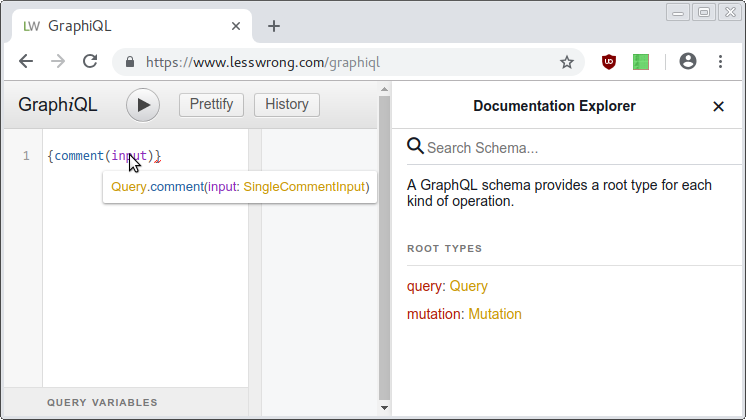
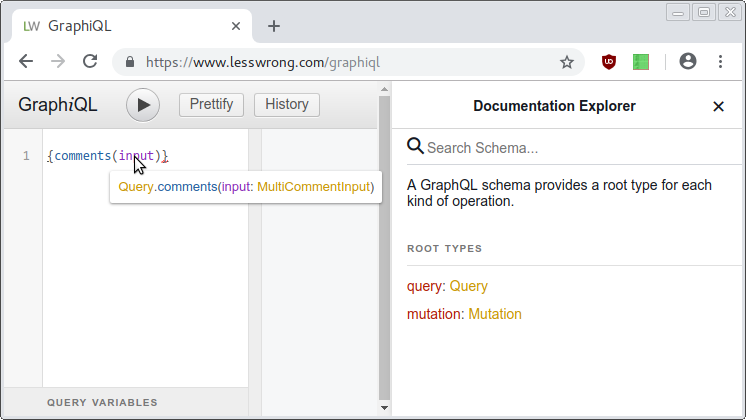
{output_type(input)}into GraphiQL and hover overinput.Here is what it looks like for the
commentoutput type:Here is what it looks like for the
commentsoutput type: -
Click on the type that appears after
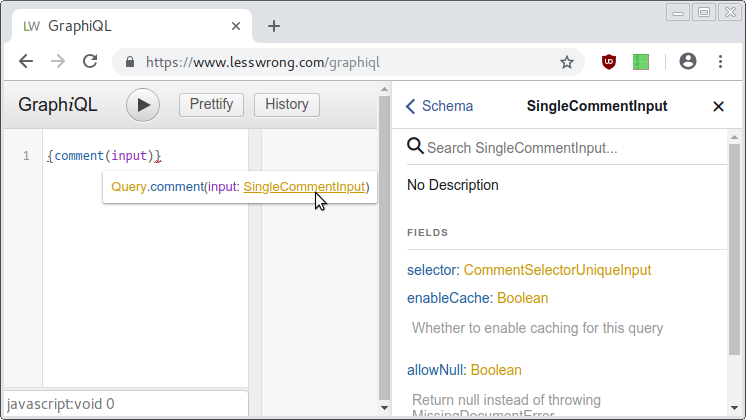
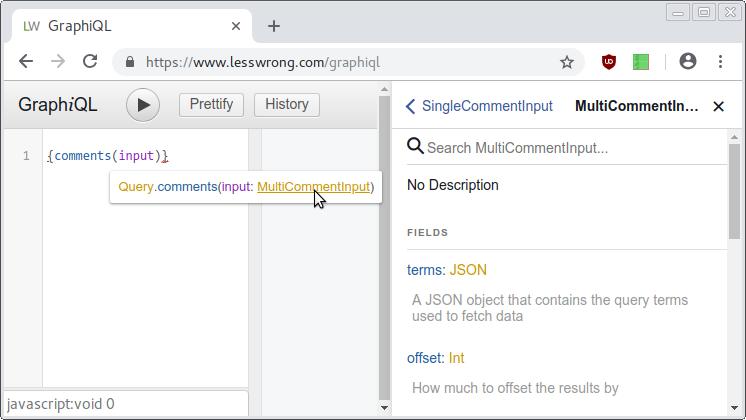
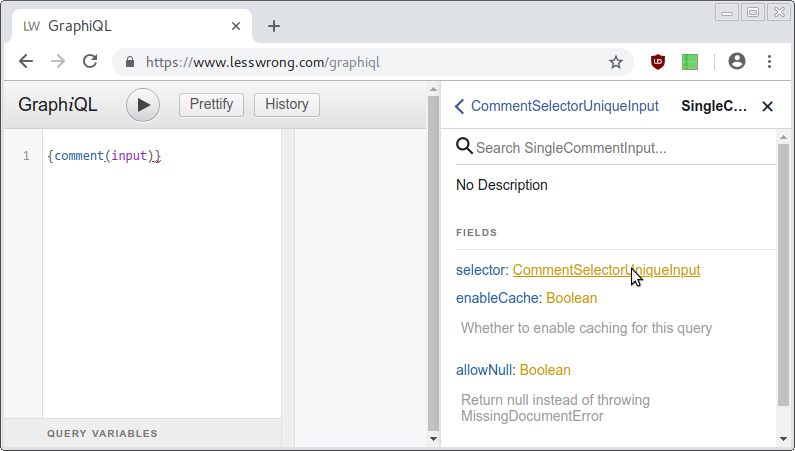
input(e.g.MultiCommentInput,SingleCommentInput). A column on the right should appear (if it was not there already). Depending on the fields listed in that column, there will now be two ways to proceed. (Generally, it seems like singular output types (e.g.comment) will haveselectorand plural output types (e.g.comments) will haveterms.)Here is what it looks like for the
commentoutput type. In the image, I have already clicked onSingleCommentInputso you can seeselectorunder the documentation (rightmost) column.Here is what it looks like for the
commentsoutput type. Again, in this image, I have already clicked onMultiCommentInputso you can seetermsunder the documentation (rightmost) column.In the fields listed, if there is
selector(e.g. forcomment):-
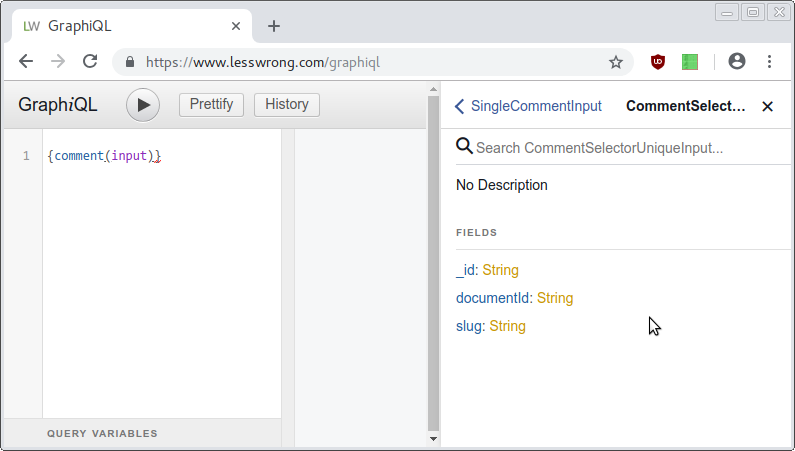
Click on the selector type (e.g.
CommentSelectorUniqueInput). Use one of the fields (e.g._id) to pick out the specific item you want.Here is what you should click on:
What it looks like after you have clicked:
If there is
terms(e.g.comments):-
Go to the collections directory in the LessWrong 2.0 codebase, and find the
views.jsfile for your output type. For example, if your output type iscomments, then the correspondingviews.jsfile is located atcollections/comments/views.js. -
Look through the various “views” in the
views.jsfile to see if there is a relevant view. (There is also a default view if you don’t select any view.) The main things to pay attention to are theselectorblock (which controls how the results will be filtered) and theoptionsblock (which mainly controls how the results are sorted). -
Pass in parameters for that view using keys in the
termsblock.
-
-
Start a
resultsblock, and select the fields you want to see for this output type. (If you don’t select any fields, it will default to all fields, so you can do that once and delete the fields you don’t need.)
Examples
I’ve built a sample interface for both LessWrong and EA Forum that allows an easy way to access the queries used to generate pages:
By passing format=queries in the URL to any page, you can view the GraphQL
queries that were made to generate that page. Rather than showing many examples
in this post, I will just show one example in this post, and let you explore
the reader.
As an example, consider the page https://eaforum.issarice.com/?view=top. Clicking on “Queries” at the top of the page takes you to the page https://eaforum.issarice.com/?view=top&offset=0&before=&after=&format=queries Here you will see the following:
    {
      posts(input: {
        terms: {
          view: "top"
          limit: 50
          meta: null  # this seems to get both meta and non-meta posts


        }
      }) {
        results {
          _id
          title
          slug
          pageUrl
          postedAt
          baseScore
          voteCount
          commentsCount
          meta
          question
          url
          user {
            username
            slug
          }
        }
      }
    }

Run this query


    {
      comments(input: {
        terms: {
          view: "recentComments"
          limit: 10
        }
      }) {
        results {
          _id
          post {
            _id
            title
            slug
          }
          user {
            _id
            slug
          }
          plaintextExcerpt
          htmlHighlight
          postId
          pageUrl
        }
      }
    }

Run this query
Clicking on “Run this query” (not linked in this tutorial, but linked in the actual page) below each query will take you to the GraphiQL page with the query preloaded. There, you can click on the “Execute Query” button (which looks like a play button) to actually run the query and see the result.
I should note that my reader implementation is optimized for my own (probably unusual) consumption and learning. For article-reading and commenting purposes (i.e. not for learning how to use GraphQL), most users will probably prefer to use the official versions of the forums or the GreaterWrong counterparts.
Tips
In GraphiQL, hovering over some words like
inputandresultsand then clicking on the resulting tooltip will show the parameters that can be passed to that block.Forum search is not done via GraphQL. Rather, a separate API (the Algolia search API) is used. Use of the search API is outside the scope of this tutorial. This is also why the search results page on my reader (example) has no “Queries” link (for now).
For queries that use a
termsblock: even though a “view” is just a shorthand for a selector/options pair, it is not possible to pass in arbitrary selector/options pairs (due to the way security is handled by Vulcan). If you don’t use a view, the default view is selected. The main consequence of this is that you won’t be able to make some queries that you might want to make.Some queries are hard/impossible to do. Examples: (1) getting comments of a user by placing conditions on the parent comment or post (e.g. finding all comments by user 1 where they are replying to user 2); (2) querying and sorting posts by a function of arbitrary fields (e.g. as a function of
baseScoreandvoteCount); (3) finding the highest-karma users looking only at the past days of activity.GraphQL vs GraphiQL:
/graphiqlseems to be endpoint for the interactive explorer for GraphQL, whereas/graphqlis the endpoint for the actual API. So when you are actually querying the API (via a program you write) I think you want to be using https://www.lesswrong.com/graphql and https://forum.effectivealtruism.org/graphql (or at least, that is what I am doing and it works).
Acknowledgments
Thanks to:
Louis Francini for helping me with some GraphQL queries and for feedback on the post and the reader.
Oliver Habryka for answering some questions I had about GraphQL.
Vipul Naik for funding my work on this post and some of my work on the reader.
- EA EDA: What do Forum Topics tell us about changes in EA? by (EA Forum; 14 Jul 2023 19:54 UTC; 106 points)
- Getting a feel for changes of karma and controversy in the EA Forum over time by (EA Forum; 7 Apr 2021 7:49 UTC; 75 points)
- Forum Karma: view stats and find highly-rated comments for any LW user by (1 Jul 2023 15:36 UTC; 60 points)
- Forum user manual by (EA Forum; 28 Apr 2022 14:05 UTC; 42 points)
- 's comment on Is EA Growing? EA Growth Metrics for 2018 by (EA Forum; 4 Jun 2019 7:38 UTC; 37 points)
- Is there an easy way to turn a LW sequence into an epub? by (18 Jul 2020 18:20 UTC; 17 points)
- Database dumps of the EA Forum by (EA Forum; 27 Jul 2021 19:19 UTC; 14 points)
- 's comment on LessWrong FAQ by (21 Oct 2020 4:49 UTC; 9 points)
- 's comment on My bargain with the EA machine by (EA Forum; 1 May 2022 23:30 UTC; 8 points)
- 's comment on Open Thread: Spring 2022 by (EA Forum; 16 Jan 2022 21:04 UTC; 4 points)
- 's comment on Open Thread: Spring 2022 by (EA Forum; 2 Jan 2022 0:16 UTC; 4 points)
- 's comment on Open Thread Autumn 2025 by (14 Oct 2025 0:31 UTC; 4 points)
- 's comment on AMA: JP Addison and Sam Deere on software engineering at CEA by (EA Forum; 23 Mar 2021 9:40 UTC; 3 points)
- 's comment on A ranked link of LessWrong tags/concepts by (24 Sep 2022 15:18 UTC; 3 points)
- 's comment on Forum Karma: view stats and find highly-rated comments for any LW user by (13 Aug 2025 13:57 UTC; 2 points)
- 's comment on How does one authenticate with the lesswrong API? by (16 Jun 2020 0:45 UTC; 2 points)
- 's comment on Open Thread: Spring 2022 by (EA Forum; 2 Jan 2022 0:33 UTC; 1 point)
- LessWrong exporting? by (3 May 2023 18:34 UTC; 0 points)
The official LessWrong 2 server is pretty heavy, so running it locally might be a problem for some people.
Whistling Lobsters 2.0 uses a clone of the LW 2 API called Accordius as its backend. Accordius is, with some minor differences, nearly an exact copy of the pre-October LW 2 API. It was developed with the goal that you could put the GreaterWrong software in front of it and it would function without changes. Unfortunately due to some implementation disagreements between Graphene and the reference GraphQL library in JavaScript, it’s only about 95% compatible at the time of cloning.
Still, this thing will run on a potato (or more specifically, my years-old Intel atom based netbook) with GreaterWrong running on the same box as the front end. That makes it a pretty good option for anyone who’s looking to understand GraphQL and the LW 2 API. This implementation does not take into account the changes made in the big API update in October. As a consequence, it may be more useful at this point for learning GraphQL than the LW 2 API specifically.
(Note to future readers: The GraphQL API is considered legacy for Accordius in the long term, so if you’re reading this many months or even years from now, you may have to go back to the first alpha releases to get the functionality described here. Pre 1.0 perhaps.)
I’ve come back to this occasionally, thanks. Here are two more snippets:
To get one post
or, as a JavaScript/node function:
To get a user
Or, as a JavaScript function
Thanks for writing this up! I’ve added it to the LW Open Source sequence.
Just in case anyone is struggling to find the relevant bits of the the codebase, my best guess is the link for the collections folder in github is now here.
You are looking in “views.ts” eg …/collections/comments/views.ts
The best thing to search for (I found) was ”.addView(” and see what fits your requirements
GraphQL beginner here: Where do I find the schema that I can import to Postman to inspect it there?
I don’t know what a schema is in Postman so I don’t know how to help you, sorry. If you go here you can see the code I am currently using to make the HTTP requests, and you can grep around in that codebase to find calls to send_query, which will give you the GraphQL queries I use.
For step 3 it seems like you now want to hover over
output_typeinstead ofinputYes, you are correct. Not sure if I want to bother with editing the post, since a bunch of other things have changed in the past 7 years and I don’t at the moment have the energy to go through the whole post and bring it up to date. But I appreciate you for bringing this up!
Can please someone post an example on how to find comments with negative agreement but positive approval?