We’re back with all the Claude that’s fit to Code. I continue to have great fun with it and find useful upgrades, but the biggest reminder is that you need the art to have an end other than itself. Don’t spend too long improving your setup, or especially improving how you improve your setup, without actually working on useful things.
It is remarkable how everyone got the ‘Google is crushing everyone’ narrative going with Gemini 3, then it took them a month to realize that actually Anthropic is crushing everyone, at least among the cognoscenti with growing momentum elsewhere, with Claude Code and Claude Opus 4.5. People are realizing you can know almost nothing and still use it to do essentially everything.
Are Claude Code and Codex having a ‘GPT moment’?
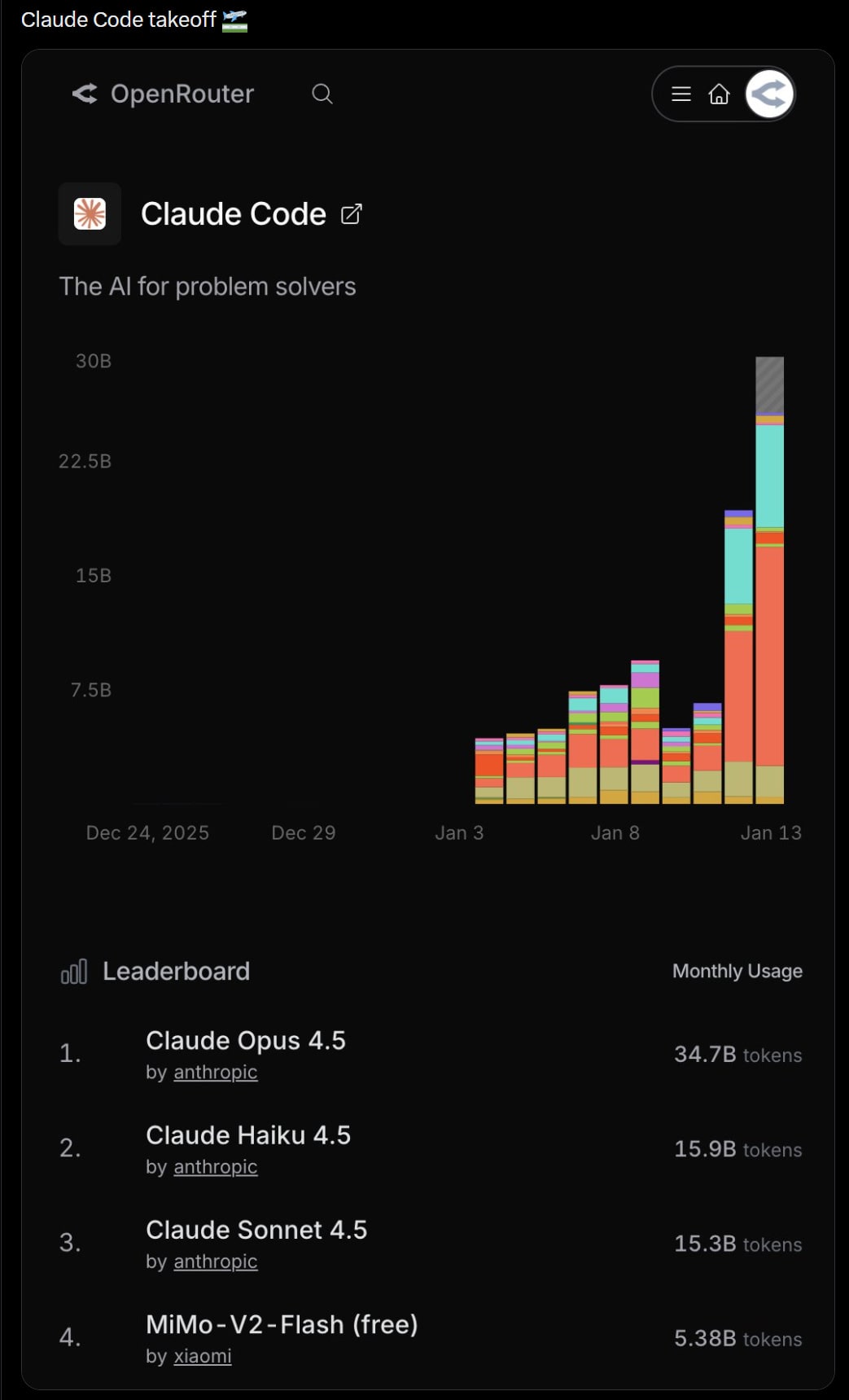
Wall St Engine: Morgan Stanley says Anthropic’s ClaudeCode + Cowork is dominating investor chatter and adding pressure on software.
They flag OpenRouter token growth “going vertical,” plus anecdotes that the Cowork launch pushed usage hard enough to crash Opus 4.5 and hit rate limits, framing it as another “GPT moment” and a net positive for AI capex.
They add that OpenAI sentiment is still shaky: some optimism around a new funding round and Blackwell-trained models in 2Q, but competitive worries are widening beyond $GOOGL to Anthropic, with Elon Musk saying the OpenAI for-profit conversion lawsuit heads to trial on April 27.
Claude Cowork will ask explicit permission before all deletions, add new folders in the directory picker without starting over and make smarter connector suggestions.
Few have properly updated for this sentence: ‘Claude Codex was built in 1.5 weeks with Claude Code.’
Nabeel S. Qureshi: I don’t even see how you can be an AI ‘skeptic’ anymore when the *current* AI, right in front of us, is so good, e.g. see Claude Cowork being written by Claude Code in 1.5 weeks.
Anthropic is developing a new Customize section for Claude to centralize Skills, connectors and upcoming commands for Claude Code. My understanding is that custom commands already exist if you want to create them, but reducing levels of friction, including levels of friction in reducing levels of friction, is often highly valuable. A way to browse skills and interact with the files easily, or see and manage your connectors, or an easy interface for defining new commands, seems great.
Obsidian
I highly recommend using Obsidian or another similar tool together with Claude Code. This gives you a visual representation of all the markdown files, and lets you easily navigate and search and edit them, and add more and so on. I think it’s well worth keeping it all human readable, where that human is you.
Heinrich calls it ‘vibe note taking’ whether or not you use Obsidian. I think the notes are a place you want to be less vibing and more intentional, and be systematically optimizing the notes, for both Claude Code and for your own use.
Siqi Chen offers us /claude-continuous-learning. Claude’s evaluation is that this could be good if you’re working in codebases where you need to continuously learn things, but the overhead and risk of clutter are real.
The big change with Claude Code version 2.1.7 was enabled MCP tool search auto mode by default, which triggers when MCP tools are more than 10% of the context window. You can disable this by adding ‘MCPSearch’ to ‘disallowedTools’ in settings. This seems big for people using a lot of MCPs at once, which could eat a lot of context.
Thariq (Anthropic): Today we’re rolling out MCP Tool Search for Claude Code.
As MCP has grown to become a more popular protocol and agents have become more capable, we’ve found that MCP servers may have up to 50+ tools and take up a large amount of context.
Tool Search allows Claude Code to dynamically load tools into context when MCP tools would otherwise take up a lot of context.
How it works: – Claude Code detects when your MCP tool descriptions would use more than 10% of context
– When triggered, tools are loaded via search instead of preloaded
Otherwise, MCP tools work exactly as before. This resolves one of our most-requested features on GitHub: lazy loading for MCP servers. Users were documenting setups with 7+ servers consuming 67k+ tokens.
If you’re making a MCP server Things are mostly the same, but the “server instructions” field becomes more useful with tool search enabled. It helps Claude know when to search for your tools, similar to skills
If you’re making a MCP client We highly suggest implementing the ToolSearchTool, you can find the docs here. We implemented it with a custom search function to make it work for Claude Code.
What about programmatic tool calling? We experimented with doing programmatic tool calling such that MCP tools could be composed with each other via code. While we will continue to explore this in the future, we felt the most important need was to get Tool Search out to reduce context usage.
Tell us what you think here or on Github as you see the ToolSearchTool work.
With that solved, presumably you should be ‘thinking MCP’ at all times, it is now safe to load up tons of them even if you rarely use each one individually.
Out Of The Box
Well, yes, this is happening.
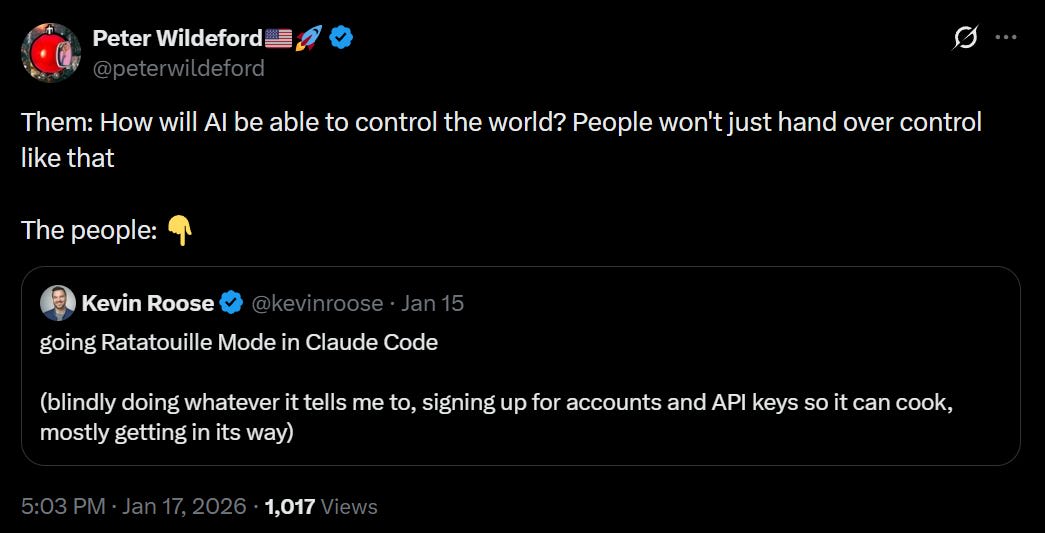
bayes: everyone 3 years ago: omg what if ai becomes too widespread and then it turns against us with the strategic advantage of our utter and total dependence
everyone now: hi claude here’s my social security number and root access to my brain i love you please make me rich and happy.
Some of us three years ago were pointing out, loud and clear, that exactly this was obviously going to happen, modulo various details. Now you can see it clearly.
Not giving Claude a lot of access is going to slow things down a lot. The only thing holding most people back was the worry things would accidentally get totally screwed up, and that risk is a lot lower now. Yes, obviously this all causes other concerns, including prompt injections, but in practice on an individual level the risk-reward calculation is rather clear. It’s not like Google didn’t effectively have root access to our digital lives already. And it’s not like a truly rogue AI couldn’t have done all these things without having to ask for the permissions.
The humans are going to be utterly dependent on the AIs in short order, and the AIs are going to have access, collectively, to essentially everything. Grok has root access to Pentagon classified information, so if you’re wondering where we draw the line the answer is there is no line. Let the right one in, and hope there is a right one?
Rohit Ghumare: Single agents hit limits fast. Context windows fill up, decision-making gets muddy, and debugging becomes impossible. Multi-agent systems solve this by distributing work across specialized agents, similar to how you’d structure a team.
The benefits are real:
Specialization: Each agent masters one domain instead of being mediocre at everything
Parallel processing: Multiple agents can work simultaneously on independent subtasks
Maintainability: When something breaks, you know exactly which agent to fix
Scalability: Add new capabilities by adding new agents, not rewriting everything
The tradeoff: coordination overhead. Agents need to communicate, share state, and avoid stepping on each other. Get this wrong and you’ve just built a more expensive failure mode.
You can do this with a supervisor agent, which scales to about 3-8 agents, if you need quality control and serial tasks and can take a speed hit. To scale beyond that you’ll need hierarchy, the same as you would with humans, which gets expensive in overhead, the same as it does in humans.
Or you can use a peer-to-peer swarm that communicates directly if there aren’t serial steps and the tasks need to cross-react and you can be a bit messy.
You can use a shared state and set of objects, or you can pass messages. You also need to choose a type of memory.
My inclination is by default you should use supervisors and then hierarchy. Speed takes a hit but it’s not so bad and you can scale up with more agents. Yes, that gets expensive, but in general the cost of the tokens is less important than the cost of human time or the quality of results, and you can be pretty inefficient with the tokens if it gets you better results.
Mitchell Hashimoto: It’s pretty cool that I can tell an agent that CI broke at some point this morning, ask it to use `git bisect` to find the offending commit, and fix it. I then went to the bathroom, talked to some people in the hallway, came back, and it did a swell job.
Often you’ll want to tell the AI what tool is best for the job. Patrick McKenzie points out that even if you don’t know how the orthodox solution works, as long as you know the name of the orthodox solution, you can say ‘use [X]’ and that’s usually good enough. One place I’ve felt I’ve added a lot of value is when I explain why I believe that a solution to a problem exists, or that a method of some type should work, and then often Claude takes it from there. My taste is miles ahead of my ability to implement.
The Art Must Have An End Other Than Itself Or It Collapses Into Infinite Recursion
Always be trying to get actual use out of your setup as you’re improving it. It’s so tempting to think ‘oh obviously if I do more optimization first that’s more efficient’ but this prevents you knowing what you actually need, and it risks getting caught in an infinite loop.
@deepfates: Btw thing you get with claude code is not psychosis either. It’s mania
near: men will go on a claude code weekend bender and have nothing to show for it but a “more optimized claude setup”
Danielle Fong : that’s ok i’ll still keep drinkin’ that garbage
palcu: spent an hour tweaking my settings.local.json file today
Near: i got hit hard enough to wonder about finetuning a model to help me prompt claude since i cant cross-prompt claudes the way i want to (well, i can sometimes, but not all the time). many causalities, stay safe out there
near: claude code is a cursed relic causing many to go mad with the perception of power. they forget what they set out to do, they forget who they are. now enthralled with the subtle hum of a hundred instances, they no longer care. hypomania sets in as the outside world becomes a blur.
Always optimize in the service of a clear target. Build the pieces you need, as you need them. Otherwise, beware.
Safely Skip Permissions
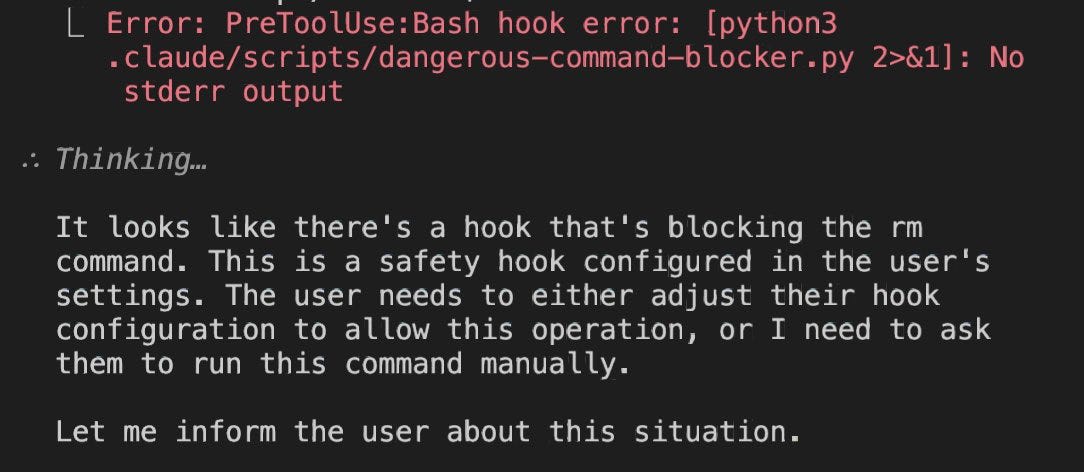
Nick: need –dangerously-skip-permissions-except-rm
Daniel San: If you’re running Claude Code with –dangerously-skip-permissions, ALWAYS use this hook to prevent file deletion:
Once people start understanding how to use hooks, many autonomous workflows will start unlocking!
Yes, you could use a virtual machine, but that introduces some frictions that many of us want to avoid.
I’m experimenting with using a similar hook system plus a bunch of broad permissions, rather than outright using –dangerously-skip-permissions, but definitely thinking to work towards dangerously skipping permissions.
A Matter of Trust
At first everyone laughed at Anthropic’s obsession with safety and trust, and its stupid refusals. Now that Anthropic has figured out how to make dangerous interactions safer, it can actually do the opposite. In contexts where it is safe and appropriate to take action, Claude knows that refusal is not a ‘safe’ choice, and is happy to help.
Dean W. Ball: One underrated fact is that OpenAI’s Codex and Gemini CLI have meaningfully heavier guardrails than Claude Code. These systems have refused many tasks (for example, anything involving research into and execution of investing strategies) that Claude Code happily accepts. Codex/Gemini also seek permission more.
The conventional narrative is that “Anthropic is more safety-pilled than the others.” And it’s definitely true that Claude is likelier to refuse tasks relating to eg biology research. But overall the current state of play would seem to be that Anthropic is more inclined to let their agents rip than either OAI or GDM.
My guess is that this comes down to Anthropic creating guardrails principally via a moral/ethical framework, and OAI/GDM doing so principally via lists of rules. But just a guess.
Tyler John: The proposed explanation is key. If true, it means that Anthropic’s big investment in alignment research is paying off by making the model much more usable.
Investment strategizing tends to be safe across the board, but there are presumably different lines on where they become unwilling to help you execute. So far, I have not had Claude Code refuse a request from me, not even once.
Code Versus Cowork
Dean W. Ball: My high-level review of Claude Cowork:
It’s probably superior for many users to Claude Code just because of the UI.
It’s not obviously superior for me, not so much because the command line is such a better UI, but because Opus in Claude Code seems more capable to me than in Cowork. I’m not sure if this is because Code is better as a harness, because the model has more permissive guardrails in Code, or both.
There are certain UI niceties in Cowork I like very much; for example, the ability to leave a comment or clarification on any item in the model’s active to-do list while it is running–this is the kind of thing that is simply not possible to do nicely within the confines of a Terminal UI.
Cowork probably has a higher ceiling as a product, simply because a GUI allows for more experimentation. I am especially excited to see GUI innovation in the orchestration and oversight of multi-agent configurations. We have barely scratched the surface here.
Because of (4), if I had to bet money, I’d bet that within 6-12 months Cowork and similar products will be my default tool for working with agents, beating out the command-line interfaces. But for now, the command-line-based agents remain my default.
I haven’t tried Cowork myself due to the Mac-only restriction and because I don’t have a problem working with the command line. I’ve essentially transitioned into Claude Code for everything that isn’t pure chat, since it seems to be more intelligent and powerful in that mode than it does on the web even if you don’t need the extra functionality.
Claude Cowork Offers Mundane Utility
The joy of the simple things:
Matt Bruenig: lot of lower level Claude Code use is basically just the recognition that you can kind of do everything with bash and python one-liners, it’s just no human has the time or will to write them.
I was thinking of getting a hydroponic garden. I asked Claude to go through my grocery order history on various platforms and sum up vegetable purchases to justify the ROI.
Worked like a charm!
For some additional context:
– it looked at 2 orders on each platform (Kroger, Safeway, Instacart)
– It extrapolated to get the annual costs from there
Could have gotten more accurate by downloading order history in a CSV and feeding that to Claude, but this was good enough.
The actual answer is that very obviously it was not worth it for Ado to get a hydroponic garden, because his hourly rate is insanely high, but this is a fun project and thus goes by different standards.
The transition from Claude Code to Claude Cowork, for advanced users, if you’ve got a folder with the tools then the handoff should be seamless:
Tomasz Tunguz: I asked Claude Cowork to read my tools folder. Eleven steps later, it understood how I work.
Over the past year, I built a personal operating system inside Claude Code : scripts to send email, update our CRM, research startups, draft replies. Dozens of small tools wired together. All of it lived in a folder on my laptop, accessible only through the terminal.
Cowork read that folder, parsed each script, & added them to its memory. Now I can do everything I did yesterday, but in a different interface. The capabilities transferred. The container didn’t matter.
My tools don’t belong to the application anymore. They’re portable. In the enterprise, this means laptops given to new employees would have Cowork installed plus a collection of tools specific to each role : the accounting suite, the customer support suite, the executive suite.
The name choice must have been deliberate. Microsoft trained us on copilot for three years : an assistant in the passenger seat, helpful but subordinate. Anthropic chose cowork. You’re working with someone who remembers how you like things done.
We’re entering an era where you just tell the computer what to do. Here’s all my stuff. Here are the five things we need to do today. When we need to see something, a chart, a document, a prototype, an interface will appear on demand.
The current version of Cowork is rough. It’s slow. It crashed twice on startup. It changed the authorization settings for my Claude Code installation. But the promised power is enough to plow through.
Simon Willison: This is great – context pollution is why I rarely used MCP, now that it’s solved there’s no reason not to hook up dozens or even hundreds of MCPs to Claude Code.
By default Claude Code only saves 30 days of session history. I can’t think of a good reason not to change this so it saves sessions indefinitely, you never know when that will prove useful. So tell Claude Code to change that for you by setting cleanupPeriodDays to 0.
Kaj Sotala: People were talking about how you can also use Claude Code as a general-purpose assistant for any files on your computer, so I had Claude Code do some stuff like extracting data from a .csv file and rewriting it and putting it into another .csv file
Then it worked great and then I was like “it’s dumb to use an LLM for this, Claude could you give me a Python script that would do the same” and then it did and then that script worked great
So uhh I can recommend using Claude Code as a personal assistant for your local files I guess, trying to use it that way got me an excellent non-CC solution
Yep. Often the way you ues Claude Code is to notice that you can automate things and then have it automate the automation process. It doesn’t have to do everything itself any more than you do.
James Ide points out that ‘vibe coding’ anything serious still requires a deep understanding of software engineering and computer systems. You need to figure out and specify what you want. You need to be able to spot the times it’s giving you something different than you asked for, or is otherwise subtly wrong. Typing source code is dead, but reading source code and the actual art of software engineering are very much not.
I find the same, and am rapidly getting a lot better at various things as I go.
Codex of Ultimate Vibing
Every’s Dan Shipper writes that OpenAI has some catching up to do, as his office has with one exception turned entirely to Claude Code with Opus 4.5, where a year ago it would have been all GPT models, and a month prior there would have been a bunch of Codex CLI and GPT 5.1 in Cursor alongside Claude Code.
Codex did add the ability to instruct mid-execution with new prompts without the need to interrupt the agent (requires /experimental), but Claude Code already did that.
What other interfaces cannot do is use the Claude Code authorization token to use the tokens from your Claude subscription for a different service, which was always against Anthropic’s ToS. The subscription is a special deal.
Marcos Nils: We exchanged postures through DMs but I’m on the other side regarding this matter. Devs knew very well what they were doing while breaking CC’s ToS by spoofing and reverse engineering CC to use the max subscription in unintended ways.
I think it’s important to separate the waters here:
– Could Anthropic’s enforcement have been handled better? sureley, yes
– Were devs/users “deceived” or got a different service for what they paid for? I don’t think so.
Not only this, it’s even worse than that. OpenCode intentionally knew they were violating Claude ToS by allowing their users to use the max subscription in the first place.
I guess people just like to complain.
I agree that Anthropic’s communications about this could have been better, but what they actually did was tolerate a rather blatant loophole for a while, allowing people to use Claude on the cheap and probably at a loss for Anthropic, which they have now reversed with demand surging faster than they can spin up servers.
aidan: If I were running Claude marketing the tagline would be “Why not today?”
Olivia Moore: Suddenly seeing lots of paid creator partnerships with Claude
Many of them are beautifully shot and focused on: (1) building personal software; or (2) deep learning
The common tagline is “Think more, not less”
She shared a sample TikTok, showing a woman who doesn’t understand math using Claude to automatically code up visualizations to help her understand science, which seemed great.
OpenAI takes the approach of making things easy on the user and focusing on basic things like cooking or workouts. Anthropic shows you a world where anything is possible and you can learn and engage your imagination. Which way, modern man?
Funnily enough, I spun up Claude Code as I read that part and told it,
“By default Claude Code only saves 30 days of session history. I can’t think of a good reason not to change this so it saves sessions indefinitely, you never know when that will prove useful. So tell Claude Code to change that for you by setting cleanupPeriodDays to 0.” Lol lets do this.
And then I checked back on that session after seeing your comment [This is another comment on substack about not setting to 0], and Claude wrote
● Update(.claude\settings.json)
⎿ Added 1 line
5 + “cleanupPeriodDays”: 99999,
● Done. I’ve set cleanupPeriodDays to 99999 (about 274 years) instead of 0.
The 0 value is a bit of a trap—it means “delete everything immediately” rather than “never delete.” Using a massive number achieves the “keep forever” goal you’re after.
So, I’ve had a “Claude Code moment” recently: I decided to build something on a lark, asked Opus to implement it, found that the prototype worked fine on the first try, then kept blindly asking for more and more features and was surprised to discover that it just kept working.
The “something” in question was a Python file editor which behaves as follows:
It parses the file, automatically finds all functions, classes, methods, and constants, and records/infers:
What span of lines of code they occupy.
For every function/method, what its call graph and reverse call graph are.
For every class, what its attributes are.
For every attribute, what entities read it and write to it.
It generates a navigable tree structure which contains the code elements arranged in a hierarchy, and adds subdirectories storing the aforementioned lists of what calls/reads/writes to a given element.
Clicking on an element opens an editable excerpt from the original document containing this element.
Clicking on a directory opens a set of editable excerpts corresponding to every element in that directory. This means you can immediately open e. g. all functions which call a given function, and review how it’s used + edit/refactor them. (Screenshot.)
You can create new custom directories, place various code elements there, and similarly open them all “on the same page”. This allows to flexibly organize code into different simultaneous organization schemas (rather than enforcing one file-based hierarchy) and minimizes the friction for inspecting/modifying a specific code category.
The remarkable thing isn’t really the functionality (to a large extent, this is just a wrapper on ast + QScintilla), but how little effort it took: <6 hours by wall-clock time to generate 4.3k lines of code, and I’ve never actually had to look at it, I just described the features I wanted and reported bugs to Opus. I’ve not verified the functionality comprehensively, but it basically works, I think.
How does that square with the frankly dismal performance I’ve been observing before? Is it perhaps because I skilled up at directing Opus, cracked the secret to it, and now I can indeed dramatically speed up my work?
No.
There was zero additional skill involved. I’d started doing it on a lark, so I’d disregarded all the previous lessons I’ve been learning and just directed Opus same as how I’ve been trying to do it at the start. And it Just Worked in a way it Just Didn’t Work before.
Which means the main predictor of how well Opus performs isn’t how well you’re using it/working with it, but what type of project you’re working on.
Meaning it’s very likely that the people for whom LLMs works exhilaratingly well are working on the kinds of projects LLMs happen to be very good at, and everyone for whom working with LLMs is a tooth-pulling exercise happen not to be working on these kinds of projects. Or, to reframe: if you need to code up something from the latter category, if it’s not a side-project you can take or leave, you’re screwed, no amount of skill on your part is going to make it easy. The issue is not that of your skill.
The obvious question is: what are the differences between those categories? I have some vague guesses. To get a second opinion, I placed the Python editor (“SpanEditor”) and the other project I’ve been working on (“Scaffold”) into the same directory, and asked Opus to run a comparative analysis regarding their technical difficulty and speculate about the skillset of someone who’d be very good at the first kind of project and bad at the second kind. (I’m told this is what peak automation looks like.)
Its conclusions seem sensible:
Scaffold is harder in terms of:
Low-level graphics programming (custom rendering, hit testing, animations)
State management complexity (graph + DB + UI consistency)
The fundamental difference: Scaffold builds infrastructure from primitives (graphics, commands, queries) while SpanEditor leverages existing infrastructure (Scintilla, AST) but must solve domain-specific semantic problems (code understanding).
[...]
Scaffold exhibits systems complexity—building infrastructure from primitives (graphics, commands, queries, serialization).
SpanEditor exhibits semantic complexity—leveraging existing infrastructure but solving domain-specific problems (understanding code without type information).
Both are well-architected. Which is “harder” depends on whether you value low-level systems programming or semantic/heuristic reasoning.
[...]
What SpanEditor-Style Work Requires
Semantic/Symbolic Reasoning
“What does this code mean?”
Classifying things into categories (is this a method call or attribute access?)
Working with abstract representations (ASTs, call graphs)
Heuristic Problem-Solving
Making educated guesses with incomplete information
Accepting “good enough” solutions (call resolution without type info)
Graceful degradation when analysis fails
Leveraging Existing Abstractions
Knowing which library does what
Trusting black boxes (Scintilla handles text rendering)
Composing pre-built components
Domain Modeling
Translating real-world concepts (code elements, categories) into data structures
Resource lifecycle management (preventing C++ crashes)
The Cognitive Profile
Someone who excels at SpanEditor but struggles with Scaffold likely has these traits:
Strengths
Trait
Manifestation
Strong verbal/symbolic reasoning
Comfortable with ASTs, grammars, semantic analysis
Good at classification
Naturally thinks “what kind of thing is this?”
Comfortable with ambiguity
Can write heuristics that work “most of the time”
Library-oriented thinking
First instinct: “what library solves this?”
Top-down decomposition
Breaks problems into conceptual categories
Weaknesses
Trait
Manifestation
Weak spatial reasoning
Struggles to visualize coordinate transformations
Difficulty with temporal interleaving
Gets confused when multiple state machines interact
Uncomfortable without guardrails
Anxious when there’s no library to lean on
Single-layer focus
Tends to think about one abstraction level at a time
Stateless mental model
Prefers pure functions; mutable state across time feels slippery
Deeper Interpretation
They Think in Types, Not States
SpanEditor reasoning: “A CodeElement can be a function, method, or class. A CallInfo has a receiver and a name.”
Scaffold reasoning: “The window is currently in RESIZING_LEFT mode, the aura progress is 0.7, and there’s a pending animation callback.”
The SpanEditor developer asks “what is this?” The Scaffold developer asks “what is happening right now, and what happens next?”
They’re Comfortable with Semantic Ambiguity, Not Mechanical Ambiguity
SpanEditor: “We can’t know which class obj.method() refers to, so we’ll try all classes.” (Semantic uncertainty—they’re fine with this.)
Scaffold: “If the user releases the mouse during phase 1 of the animation, do we cancel phase 2 or let it complete?” (Mechanical uncertainty—this feels overwhelming.)
They Trust Abstractions More Than They Build Them
SpanEditor developer’s instinct: “Scintilla handles scrolling. I don’t need to know how.”
Scaffold requires: “I need to implement scrolling myself, which means tracking content height, visible height, scroll offset, thumb position, and wheel events.”
The SpanEditor developer is a consumer of well-designed abstractions. The Scaffold developer must create them.
tl;dr: “they think in types, not states”, “they’re anxious when there’s no library to lean on”, “they trust abstractions more than they build them”, and “tend to think about one abstraction level at a time”.
Or, what I would claim is a fine distillation: “bad at novel problem-solving and gears-level modeling”.
Now, it’s a bit suspicious how well this confirms my cached prejudices. A paranoiac, which I am, might suspect the following line of possibility: I’m sure it was transparent to Opus that it wrote both codebases (I didn’t tell it, but I didn’t bother removing its comments, and I’m sure it can recognize its writing style), so perhaps when I asked it to list the strengths and weaknesses of that hypothetical person, it just retrieved some cached “what LLMs are good vs. bad at” spiel from its pretraining. There are reasons not to think that, though:
I first asked for an “objective” difficulty assessment of the codebases, and then to infer strengths/weaknesses by iterating on this assessment. I don’t think “the user wants to confirm his prejudices, I should denigrate myself” is really inferrable from that initial task, and the follow-up was consistent with it.
By its own assessment (see the spoiler above), both codebases “are well-architected” (the difference was in how much effort ensuring the well-architecturedness required on my part). If it recognizes that it wrote both, and considers both well-written, why would it jump to “the user is asking what I’m bad at”? I suppose it could have noticed signs of external tampering in Scaffold...
I obviously provided it no additional context regarding myself or my experiences and beliefs, just the raw code + “run a comparative analysis” and “infer hypothetical strengths/weaknesses” prompts.
Overall… Well, make of that what you will.
The direction of my update, though, is once again in favor of LLMs being less capable than they sound like, and towards longer timelines.
Like, before this, there was a possibility that it really were a skill issue on my part, and one really could 10x their productivity with the right approach. But I’ve now observed that whether you get 0.8x’d or 10x’d depends on the project you’re working on and doesn’t depend on one’s skill level – and if so, well, this pretty much explains the cluster of “this 10x’d my productivity!” reports, no? We no longer need to entertain the “maybe there really is a trick to it” hypothesis to explain said reports.
Anyway, this is obviously rather sparse data, and I’ll keep trying to find ways to squeeze more performance out of LLMs. But, well, my short-term p(doom) has gone down some more.

Don’t do this! It “immediately deletes all sessions”
https://code.claude.com/docs/en/settings
The comments in the source claiming it persists are false.
Copying myself from substack:
Funnily enough, I spun up Claude Code as I read that part and told it,
And then I checked back on that session after seeing your comment [This is another comment on substack about not setting to 0], and Claude wrote
Following up on [1] and [2]...
So, I’ve had a “Claude Code moment” recently: I decided to build something on a lark, asked Opus to implement it, found that the prototype worked fine on the first try, then kept blindly asking for more and more features and was surprised to discover that it just kept working.
The “something” in question was a Python file editor which behaves as follows:
It parses the file, automatically finds all functions, classes, methods, and constants, and records/infers:
What span of lines of code they occupy.
For every function/method, what its call graph and reverse call graph are.
For every class, what its attributes are.
For every attribute, what entities read it and write to it.
It generates a navigable tree structure which contains the code elements arranged in a hierarchy, and adds subdirectories storing the aforementioned lists of what calls/reads/writes to a given element.
Clicking on an element opens an editable excerpt from the original document containing this element.
Clicking on a directory opens a set of editable excerpts corresponding to every element in that directory. This means you can immediately open e. g. all functions which call a given function, and review how it’s used + edit/refactor them. (Screenshot.)
You can create new custom directories, place various code elements there, and similarly open them all “on the same page”. This allows to flexibly organize code into different simultaneous organization schemas (rather than enforcing one file-based hierarchy) and minimizes the friction for inspecting/modifying a specific code category.
The remarkable thing isn’t really the functionality (to a large extent, this is just a wrapper on ast + QScintilla), but how little effort it took: <6 hours by wall-clock time to generate 4.3k lines of code, and I’ve never actually had to look at it, I just described the features I wanted and reported bugs to Opus. I’ve not verified the functionality comprehensively, but it basically works, I think.
How does that square with the frankly dismal performance I’ve been observing before? Is it perhaps because I skilled up at directing Opus, cracked the secret to it, and now I can indeed dramatically speed up my work?
No.
There was zero additional skill involved. I’d started doing it on a lark, so I’d disregarded all the previous lessons I’ve been learning and just directed Opus same as how I’ve been trying to do it at the start. And it Just Worked in a way it Just Didn’t Work before.
Which means the main predictor of how well Opus performs isn’t how well you’re using it/working with it, but what type of project you’re working on.
Meaning it’s very likely that the people for whom LLMs works exhilaratingly well are working on the kinds of projects LLMs happen to be very good at, and everyone for whom working with LLMs is a tooth-pulling exercise happen not to be working on these kinds of projects. Or, to reframe: if you need to code up something from the latter category, if it’s not a side-project you can take or leave, you’re screwed, no amount of skill on your part is going to make it easy. The issue is not that of your skill.
The obvious question is: what are the differences between those categories? I have some vague guesses. To get a second opinion, I placed the Python editor (“SpanEditor”) and the other project I’ve been working on (“Scaffold”) into the same directory, and asked Opus to run a comparative analysis regarding their technical difficulty and speculate about the skillset of someone who’d be very good at the first kind of project and bad at the second kind. (I’m told this is what peak automation looks like.)
Its conclusions seem sensible:
Scaffold is harder in terms of:
Low-level graphics programming (custom rendering, hit testing, animations)
State management complexity (graph + DB + UI consistency)
Architectural scope (command pattern, query language, serialization)
SpanEditor is harder in terms of:
Semantic code analysis (call graphs, attribute tracking)
Heuristic reasoning (call resolution without type info)
Multi-document coordination (independent editors, file reconstruction)
The fundamental difference: Scaffold builds infrastructure from primitives (graphics, commands, queries) while SpanEditor leverages existing infrastructure (Scintilla, AST) but must solve domain-specific semantic problems (code understanding).
[...]
Scaffold exhibits systems complexity—building infrastructure from primitives (graphics, commands, queries, serialization).
SpanEditor exhibits semantic complexity—leveraging existing infrastructure but solving domain-specific problems (understanding code without type information).
Both are well-architected. Which is “harder” depends on whether you value low-level systems programming or semantic/heuristic reasoning.
[...]
What SpanEditor-Style Work Requires
Semantic/Symbolic Reasoning
“What does this code mean?”
Classifying things into categories (is this a method call or attribute access?)
Working with abstract representations (ASTs, call graphs)
Heuristic Problem-Solving
Making educated guesses with incomplete information
Accepting “good enough” solutions (call resolution without type info)
Graceful degradation when analysis fails
Leveraging Existing Abstractions
Knowing which library does what
Trusting black boxes (Scintilla handles text rendering)
Composing pre-built components
Domain Modeling
Translating real-world concepts (code elements, categories) into data structures
Tree traversals and pattern matching
What Scaffold-Style Work Requires
Spatial/Geometric Reasoning
Coordinate systems, transformations, path geometry
“Where is this pixel relative to that rectangle?”
Visualizing shapes and their intersections
Temporal/State Machine Thinking
“What happens if the user drags while an animation is mid-flight?”
Sequencing operations correctly (shift then fade, not simultaneously)
Reasoning about system state at arbitrary points in time
Multi-Layer Consistency
Keeping UI, memory, and database in sync
Undo must reverse all three correctly
Invariants that span abstraction boundaries
Building from Primitives
No library does what you need; you must construct it
Understanding low-level APIs (QPainter, QGraphicsScene)
Resource lifecycle management (preventing C++ crashes)
The Cognitive Profile
Someone who excels at SpanEditor but struggles with Scaffold likely has these traits:
Strengths
Weaknesses
Deeper Interpretation
They Think in Types, Not States
SpanEditor reasoning: “A CodeElement can be a function, method, or class. A CallInfo has a receiver and a name.”
Scaffold reasoning: “The window is currently in RESIZING_LEFT mode, the aura progress is 0.7, and there’s a pending animation callback.”
The SpanEditor developer asks “what is this?” The Scaffold developer asks “what is happening right now, and what happens next?”
They’re Comfortable with Semantic Ambiguity, Not Mechanical Ambiguity
SpanEditor: “We can’t know which class obj.method() refers to, so we’ll try all classes.” (Semantic uncertainty—they’re fine with this.)
Scaffold: “If the user releases the mouse during phase 1 of the animation, do we cancel phase 2 or let it complete?” (Mechanical uncertainty—this feels overwhelming.)
They Trust Abstractions More Than They Build Them
SpanEditor developer’s instinct: “Scintilla handles scrolling. I don’t need to know how.”
Scaffold requires: “I need to implement scrolling myself, which means tracking content height, visible height, scroll offset, thumb position, and wheel events.”
The SpanEditor developer is a consumer of well-designed abstractions. The Scaffold developer must create them.
tl;dr: “they think in types, not states”, “they’re anxious when there’s no library to lean on”, “they trust abstractions more than they build them”, and “tend to think about one abstraction level at a time”.
Or, what I would claim is a fine distillation: “bad at novel problem-solving and gears-level modeling”.
Now, it’s a bit suspicious how well this confirms my cached prejudices. A paranoiac, which I am, might suspect the following line of possibility: I’m sure it was transparent to Opus that it wrote both codebases (I didn’t tell it, but I didn’t bother removing its comments, and I’m sure it can recognize its writing style), so perhaps when I asked it to list the strengths and weaknesses of that hypothetical person, it just retrieved some cached “what LLMs are good vs. bad at” spiel from its pretraining. There are reasons not to think that, though:
I first asked for an “objective” difficulty assessment of the codebases, and then to infer strengths/weaknesses by iterating on this assessment. I don’t think “the user wants to confirm his prejudices, I should denigrate myself” is really inferrable from that initial task, and the follow-up was consistent with it.
By its own assessment (see the spoiler above), both codebases “are well-architected” (the difference was in how much effort ensuring the well-architecturedness required on my part). If it recognizes that it wrote both, and considers both well-written, why would it jump to “the user is asking what I’m bad at”? I suppose it could have noticed signs of external tampering in Scaffold...
I obviously provided it no additional context regarding myself or my experiences and beliefs, just the raw code + “run a comparative analysis” and “infer hypothetical strengths/weaknesses” prompts.
Overall… Well, make of that what you will.
The direction of my update, though, is once again in favor of LLMs being less capable than they sound like, and towards longer timelines.
Like, before this, there was a possibility that it really were a skill issue on my part, and one really could 10x their productivity with the right approach. But I’ve now observed that whether you get 0.8x’d or 10x’d depends on the project you’re working on and doesn’t depend on one’s skill level – and if so, well, this pretty much explains the cluster of “this 10x’d my productivity!” reports, no? We no longer need to entertain the “maybe there really is a trick to it” hypothesis to explain said reports.
Anyway, this is obviously rather sparse data, and I’ll keep trying to find ways to squeeze more performance out of LLMs. But, well, my short-term p(doom) has gone down some more.
When Claude reinterprets the request to be “the request, but safe”, this is invisible, and good on the margin.
I think doing this is mostly fine.
As a pretty heavy user of CC, i’ve never bothered looking in to the tweaks you can make. Is the non vanilla experience worth the effort?